# Google2FA for Laravel








### Google Two-Factor Authentication Package for Laravel
Google2FA is a PHP implementation of the Google Two-Factor Authentication Module, supporting the HMAC-Based One-time Password (HOTP) algorithm specified in [RFC 4226](https://tools.ietf.org/html/rfc4226) and the Time-based One-time Password (TOTP) algorithm specified in [RFC 6238](https://tools.ietf.org/html/rfc6238).
This package is a Laravel bridge to [Google2FA](https://github.com/antonioribeiro/google2fa)'s PHP package.
The intent of this package is to create QRCodes for Google2FA and check user typed codes. If you need to create backup/recovery codes, please check below.
### Recovery/Backup codes
if you need to create recovery or backup codes to provide a way for your users to recover a lost account, you can use the [Recovery Package](https://github.com/antonioribeiro/recovery).
## Demos, Example & Playground
Please check the [Google2FA Package Playground](https://pragmarx.com/playground/google2fa#/).

Here's an demo app showing how to use Google2FA: [google2fa-example](https://github.com/antonioribeiro/google2fa-example).
You can scan the QR code on [this (old) demo page](https://antoniocarlosribeiro.com/technology/google2fa) with a Google Authenticator app and view the code changing (almost) in real time.
## Compatibility
| Laravel | [Google2FA](https://github.com/antonioribeiro/google2fa) | Google2FA-Laravel |
|---------|-----------|-------------------|
| 4.2 | <= 1.0.1 | |
| 5.0-5.1 | <= 1.0.1 | |
| 5.2-5.6 | >= 2.0.0 | >= 0.2.0 |
Before Google2FA 2.0 (Laravel 5.1) you have to install `pragmarx/google2fa:~1.0`, because this package was both a Laravel package and a PHP (agnostic).
## Demo
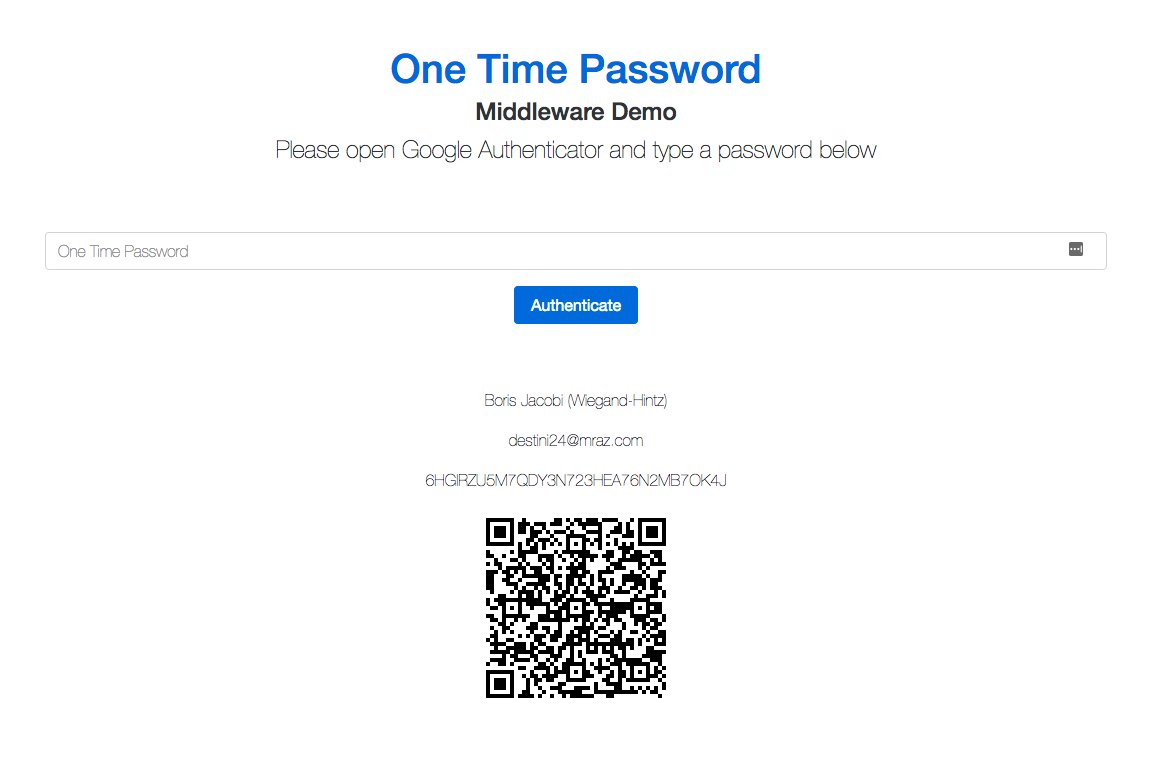
Click [here](https://pragmarx.com/google2fa/middleware) to see the middleware demo:
## Installing
Use Composer to install it:
composer require pragmarx/google2fa-laravel
If you prefer inline QRCodes instead of a Google generated url, you'll need to install [BaconQrCode](https://github.com/Bacon/BaconQrCode):
composer require bacon/bacon-qr-code
## Installing on Laravel
### Laravel 5.5
You don't have to do anything else, this package autoloads the Service Provider and create the Alias, using the new Auto-Discovery feature.
### Laravel 5.4 and below
Add the Service Provider and Facade alias to your `app/config/app.php` (Laravel 4.x) or `config/app.php` (Laravel 5.x):
``` php
PragmaRX\Google2FALaravel\ServiceProvider::class,
'Google2FA' => PragmaRX\Google2FALaravel\Facade::class,
```
## Publish the config file
``` php
php artisan vendor:publish --provider="PragmaRX\Google2FALaravel\ServiceProvider"
```
## Using It
#### Use the Facade
``` php
use Google2FA;
return Google2FA::generateSecretKey();
```
#### In Laravel you can use the IoC Container
``` php
$google2fa = app('pragmarx.google2fa');
return $google2fa->generateSecretKey();
```
## Middleware
This package has a middleware which will help you code 2FA on your app. To use it, you just have to:
### Add the middleware to your Kernel.php:
``` php
protected $routeMiddleware = [
...
'2fa' => \PragmaRX\Google2FALaravel\Middleware::class,
];
```
### Using it in one or more routes:
``` php
Route::get('/admin', function () {
return view('admin.index');
})->middleware(['auth', '2fa']);
```
### Configuring the view
You can set your 'ask for a one time password' view in the config file (config/google2fa.php):
``` php
/**
* One Time Password View
*/
'view' => 'google2fa.index',
```
And in the view you just have to provide a form containing the input, which is also configurable:
``` php
/**
* One Time Password request input name
*/
'otp_input' => 'one_time_password',
```
Here's a form example:
```html
```
## One Time Password Lifetime
Usually an OTP lasts forever, until the user logs off your app, but, to improve application safety, you may want to re-ask, only for the Google OTP, from time to time. So you can set a number of minutes here:
``` php
/**
* Lifetime in minutes.
* In case you need your users to be asked for a new one time passwords from time to time.
*/
'lifetime' => 0, // 0 = eternal
```
And you can decide whether your OTP will be kept alive while your users are browsing the site or not:
``` php
/**
* Renew lifetime at every new request.
*/
'keep_alive' => true,
```
## Manually logging out from 2Fa
This command wil logout your user and redirect he/she to the 2FA form on the next request:
``` php
Google2FA::logout();
```
If you don't want to use the Facade, you may:
``` php
use PragmaRX\Google2FALaravel\Support\Authenticator;
(new Authenticator(request()))->logout();
```
## Throttling / Lockout after X attempts
Unless you need somethig really fancy, you can probably use Laravel's [route throttle middleware](https://laravel.com/docs/5.8/middleware) for that:
```php
Route::get('/admin', function () {
return view('admin.index');
})->middleware(['auth', '2fa', 'throttle']);
```
## Stateless usage
```php
$authenticator = app(Authenticator::class)->bootStateless($request);
if ($authenticator->isAuthenticated()) {
// otp auth success!
}
```
You can also use a stateless middleware:
``` php
protected $routeMiddleware = [
...
'2fa' => \PragmaRX\Google2FALaravel\MiddlewareStateless::class,
];
```
## Events
The following events are fired:
- EmptyOneTimePasswordReceived
- LoggedOut
- LoginFailed
- LoginSucceeded
- OneTimePasswordExpired
- OneTimePasswordRequested
## Documentation
Check the ReadMe file in the main [Google2FA](https://github.com/antonioribeiro/google2fa) repository.
## Tests
The package tests were written with [phpspec](http://www.phpspec.net/en/latest/).
## Author
[Antonio Carlos Ribeiro](http://twitter.com/iantonioribeiro)
## License
Google2FA is licensed under the MIT License - see the `LICENSE` file for details
## Contributing
Pull requests and issues are more than welcome.